
JoomlaWorks Extension Updates

JoomlaWorks is developing and supporting some of the most respected and popular extensions in the Joomla! community, including the groundbreaking K2, AllVideos, Simple Image Gallery and Frontpage Slideshow. Since 2006 we have developed more than 26 extensions for the Joomla! CMS, all of which have been used in hundreds of thousands of Joomla! sites across the world. Late 2010, our extensions had been downloaded more that 4 million times, out of which AllVideos and Simple Image Gallery had more than 1.5 million downloads each and K2 more than 350,000! Innovation and the open source philosophy are the two things that motivate us!
  1. Quick Menu

    Quick Menu is a Joomla 4, 5 & 6 administrator module which adds a handy quick menu to the Joomla backend to restore UX sanity!

    FEATURES

    • Less clicks to important content management and admin tasks in the Joomla backend... duh!
    • Neatly organize the menu in 2 columns (for admins), one to access common content management tasks and one to access common admin tasks. Keep in mind that not everything is included and for good reason: keep things simple.
    • Respects configured backend access permissions for your user groups. In other words, plain content managers will see menu options for what they can only access, whereas Super Admins will see menu options for everything.
    • Supports 20 languages by default: English (en-GB), Chinese Simplified (zh-CN), Hindi (hi-IN), Spanish (es-ES), French (fr-FR), Arabic (ar-AA), Bengali (bn-BD), Portuguese (pt-BR), Russian (ru-RU), Urdu (ur-PK), Indonesian (id-ID), German (de-DE), Japanese (ja-JP), Swahili (sw-KE), Marathi (mr-IN), Telugu (te-IN), Turkish (tr-TR), Tamil (ta-IN), Vietnamese (vi-VN), and Korean (ko-KR).

    PREVIEW
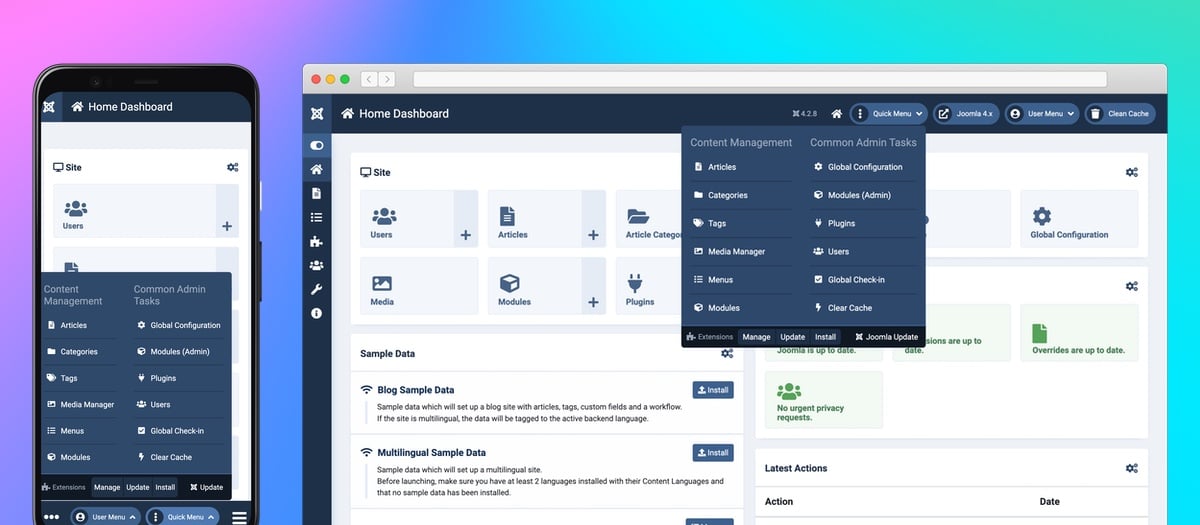
    QuickMenu Preview 1200x525

    MORE PREVIEWS

    {gallery}extensions/quickmenu/previews-2.x-20261120{/gallery}

    HOW TO USE

    • Install the module.
    • After installation, locate the module in Administrator Modules and click to edit it. Or click the handy direct link to Administrator Modules from the module installation message.
    • Assign the "status" module position & publish.
    • Done!

    Updating is easy as future releases will show up in the extension updates page in Joomla.

    COMPATIBILITY

    Quick Menu is compatible with Joomla versions 4.x, 5.x, and 6.x on servers running PHP 8.x (and PHP 7.4+ on Joomla 4).

    LICENSE

    Quick Menu is a Joomla module developed by JoomlaWorks, released under the GNU General Public License.

    DISCUSS - SHARE IDEAS/FEATURES

    Discuss or share ideas/features about this extension in our forum:

    https://www.joomlaworks.net/forum/other-free-extensions

  2. Simple Image Gallery Pro

    Adding image galleries inside your Joomla articles has never been easier!

    Using the "Simple Image Gallery PRO" extension from JoomlaWorksyou can quickly display a folder of images on your server as a stylish image gallery within any Joomla article, K2 item, Virtuemart or HikaShop product and any other Joomla extension that loads the Joomla WYSIWYG editor (TinyMCE, JCE, JCK Editor etc.).

    The process is dead-simple. You just click the "Simple Image Gallery PRO" editor plugin button located under any WYSIWYG editor box, anywhere in Joomla and you can easily select an image folder to present as an image gallery on your site. Don't have images uploaded yet? You can just drag and drop images in the extension's built-in uploader and batch upload images, one by one, without overloading your server or requiring high memory limits from PHP. Then add captions using the intuitive interface, save and simply select to add inside your Joomla content.

    The "Simple Image Gallery PRO" editor plugin will insert a Joomla plugin snippet for every image gallery (something like { gallery}mygallery:200:140:0:2{/gallery} inside the editor content) and then this snippet will "automagically" present as an image gallery, in a stylish thumbnail grid (or slideshow) with "lightbox" popups to showcase the original images, when users click on the thumbnails!

    "Simple Image Gallery PRO" is the best Joomla gallery system because a) it's easy to use & manage, b) it allows you to embed image galleries right where your content is (and not redirect your visitors to some other "gallery" section!), c) it offers multiple layouts/templates to present your image gallery and d) it supports the best popup (lightbox/modal) engines to display the original images.

    Check out the demo we prepared, showcasing multiple galleries with different layouts on the same page.

    So now:

    a) you don't need to have an additional gallery component to display your images and/or redirect your visitors elsewhere, as the galleries integrate with your Joomla articles, K2 items, Virtuemart/HikaShop products or any other component that allows "plugin parsing" and also utilizes Joomla WYSIWYG editor plugins.

    b) you focus more on content writing and less on managing the images! You are not limited to embedding one gallery per article, you can embed as many as you want.

    c) you don't have to worry about upgrades. Simply install any new version of the extension on top of the old one and your galleries will inherit any new features! Fully backwards compatible and better still, it works with Joomla versions 1.5 to 3.x & 3.x UTD!

    FEATURES

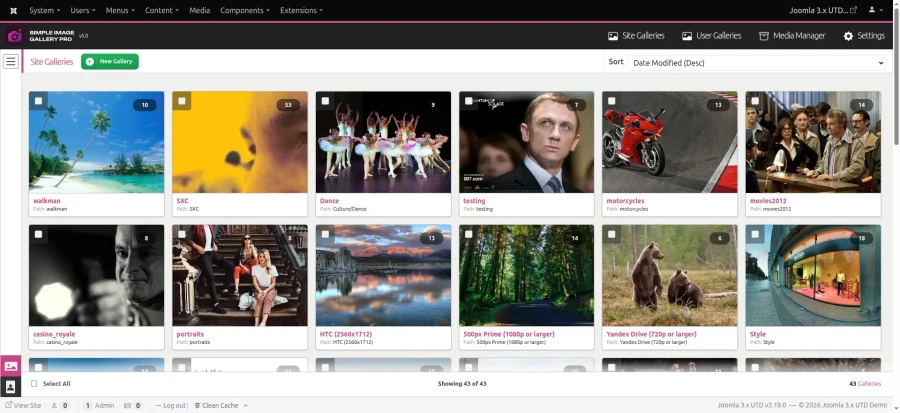
    • Amazing backend component and WYSIWYG editor plugin allow you to fully control gallery creation, previewing and editing, either on a centralized place (the component) or inside any component form that load a Joomla WYSIWYG editor: We have created a new design philosophy that blends amazingly well with the Joomla admin user interface. And it's also consistent on all supported Joomla versions (1.5 to 3.x & 3.x UTD which is PHP 8.x compatible, released in 2026). You, your clients and your content writers will love it. And when you upgrade to a newer Joomla version, they won't need to adapt to a new design, because the design is consistent across different Joomla versions.
    • Fully responsive frontend & backend (as of v4.0)
    • Infinite scrolling by default in the backend gallery grid (as of v4.0) - with classic pagination optional
    • Fully configurable thumbnails: Adjust the default width and height, set the thumbnail quality or go the modern way: configure aspect ratios and set target width for 3 resized copies per source image (small, medium & large), as of v4.0. You can even have different galleries displayed with thumbnails of different dimensions on the same page! You set all this options right before inserting an image gallery into your content. It's a piece of cake.
    • Captions in your galleries: Don't just create image grids. Add meaningful information under each thumbnail! Using the Simple Image Gallery Pro backend interface (accessible via the component or the WYSIWYG editor plugin) you can optionally provide a short title and a more detailed description text per image. You can even use full HTML code inside the image description which is displayed on the lightbox popup. Don't want to add captions? You don't have to, it's completely optional. Continue to just upload images inside Simple Image Gallery Pro and let it do everything else!
    • 10 amazing gallery layouts (themes), including "Polaroids" and the JavaScript enhanced "Galleria", "Slickshow" & "Carousel" (as of v4.0) which transform your gallery to a slideshow.
    • Gallery layouts are based on the MVC architecture, which means you can fully override all gallery layouts (both HTML and CSS) to match your needs - and without caring about future updates of the plugin breaking your unique gallery layout! You just place the overrides inside your Joomla template's folder structure.
    • All modern CSS layout with CSS Grid used for flexible layouts.
    • New super modal, as of v4.0, for large image previews, fully responsive - a joy to navigate through images on any device. Slideshow option built-in, gallery grid preview without leaving the modal, fullscreen mode, download source image button, zoom in/out, with full touch gestures to support any device. We dare to say it's probably the best vanilla JS based modal ever created! We still keep some older "popup engines", all fully updated (Lightbox 3, Fancybox, Strip etc.).
    • Flickr Gallery/Album/Set integration: Probably the easiest way to embed a Flickr set of images... Just paste the Flickr URL within the plugin's { gallery} tags like this { gallery}http://www.flickr.com/photos/joomlaworks/sets/72157626907305094/{/gallery} and you're done!
    • Single thumbnail mode: only one thumbnail shows up in place of your normal gallery but once you click on it, you can browse though the entire source gallery folder! This mode is ideal for powerpoint-like presentations.
    • 3 sizes generated for each source image, to cover multiple devices & layouts: As of version 4.0, for each source image we generate 3 resized copies in WebP that are stored under /media/jw_sigpro and are only ever purged if a gallery is changed, for better end-to-end performance. Gone are the days of saving single thumbnails to the /cache folder.
    • Allow source image downloading: want your visitors to download the original images you uploaded? Just turn on the related component parameter and your visitors will see a download link in the modal.
    • Embed a module position in the popups: want to serve banners in all your popup images? Just include a module position which fetches banners from some banner module and let Simple Image Gallery Pro do the rest!
    • Print stylesheet: A "print" stylesheet makes sure your galleries won't look messed up when visitors print your articles (cause browsers don't render background images when printing). Simple Image Gallery Pro hides all your galleries and puts an anchor link in place, when printing a page with galleries on it. So your visitors have a point of reference for their galleries and if they print your pages as PDFs, the get working links to click on when they view the PDF file!
    • Fully integrates with K2, the popular content extension for Joomla, inside the "Image Gallery" tab of the K2 item forms.
    • Advanced features include the setting of different gallery layouts (themes) and/or popup engines per gallery on the same page!
    • New extended syntax for more flexibility (for power users). Allows you to use multiple gallery layouts and/or multiple popup engines under the same page!
    • Backwards compatibility with the free version. You just uninstall the free version, install the PRO version and you're done! No need to re-edit your existing content items (articles) that previously included image galleries, inserted with the free version. If you forget to uninstall the free version, Simple Image Gallery Pro will gently remind you.
    • Requirements auto-detect: if something is not set up properly in your site or server or if a selected image folder is wrong or already deleted, preventing Simple Image Gallery Pro to operate properly, the extension can detect any limitations and notify you accordingly.
    • Frontend image gallery uploading is now possible to isolated user folders! That means your community's users or your site's content contributors can now use the handy Simple Image Gallery Pro editor button to upload and manage image galleries for their content. This option is applicable to any Joomla extension that allows frontend editing for its content (e.g. K2 or the default Joomla article system).
    • Better ACL integration for Joomla 2.5 or later. You can now assign permissions to create, edit and/or delete to separate Joomla user groups in the backend.
    • Enforce a file size limit (e.g. 300kb or 2mb) for each image in the gallery uploader.
    • Reads EXIF orientation data and properly rotates (or flips) images, which means there's now no need to use desktop software to manipulate image orientation first (especially on images taken on pro DSLR cameras).
    • Image generation using ImageMagick (with PHP's GD as fallback), generating thumbnails in WebP format (with JPEG as fallback).
    • Compatible with Joomla 1.5, 2.5 & 3.x and Joomla 3.x UTD (which is PHP 8.x, MySQL 8.0+ compatible).
    • Compatible with PHP versions 5.6 to 8.5

    THE NEW BACKEND MANAGEMENT INTERFACE

    {gallery}SIGPro_v3_Inserting_a_new_image_gallery_20190514::::2{/gallery}

    UPDATES

    Already a customer? Download updates!

  3. Simple RSS Feed Reader

    Adding RSS/Atom syndicated content inside your Joomla website is now super-easy and simple with the 'Simple RSS Feed Reader' module from JoomlaWorks. All you have to do is add a few feeds to the module parameters, publish the module in some position and that's it!

    You can even publish multiple feeds at the same time (meaning in the same module instance) and have them display combined!

    The 'Simple RSS Feed Reader' module is based on the same feed parsing engine that powers JoomlaReader.com, the most popular Joomla news aggregator in the Joomla Community.

    The feeds are stored inside your Joomla site's cache folder and refreshed in a specific time interval, which you set in the module's parameters. This feed cache is different to Joomla's cache, as you may need to have your site refreshed every 5 minutes, but have the feeds the module retrieves stored longer than 5 minutes.


    FEATURES

    • one input box for feeds enables you to add unlimited feeds per module instance
    • combine multiple feeds into one output list
    • show or hide the first image inside each feed content
    • extract and resize remote images for more layout control
    • there's an additional option to serve resized images using a remote image resizing service (Images.weserv.nl - powered by CloudFlare's CDN) for fast loading times and without stressing your server
    • additional content options include pre-text, post-text and a custom link option at the bottom of the feeds block
    • MVC templating is standard - the module comes pre-packed with 3 sub-templates that will fit most sites - they also serve as a great starting point if you want to create your own
    • a special 3rd template (which was added in v3.8.0) allows for rendering any YouTube Playlist's feed as a list of videos (requires the use of the AllVideos plugin - also free)
    • one input box for feeds enables you to add unlimited sources to your module  

    After you install the module, add one or more feed sources in the related box under "Fetch Options" and simply adjust the "Feed Content Options" in the module parameters.


    STYLING

    The module comes with 3 sub-templates, which should be sufficient for most websites. If you want more control, you can simply override both the generated HTML and CSS, using MVC template overrides within your Joomla template. Or you can create new folders inside your template's /html/mod_jw_srfr/ folder and just select the new ones in the module's parameters.

    The compact template is inspired by JoomlaReader.com.


    COMPATIBILITY

    Simple RSS Feed Reader is fully compatible with Joomla versions 1.5, 2.5 & 3.x on servers running PHP versions 5, 7 & 8.

    A version for Joomla 4.x will be released soon.


    LICENSE

    Simple RSS Feed Reader is a Joomla module developed by JoomlaWorks, released under the GNU General Public License.

  4. Simple Image Gallery

    Adding image galleries inside your Joomla articles is now super-easy and simple, using the magical "Simple Image Gallery" plugin for Joomla.

    The plugin can turn any folder of images located inside your Joomla website into a grid-style image gallery with cool lightbox previews. And all that using a simple plugin tag like {gallery}myphotos{/gallery}.


    So for example, if we have a folder called "my_trip_to_Paris" located in images/stories/my_trip_to_Paris, then we can create our gallery by simply entering the tag {gallery}my_trip_to_Paris{/gallery} into some Joomla article.

    The galleries created are presented as a grid of image thumbnails. When your visitors click on a thumbnail, they see the original image in a lightbox popup. The thumbnails are generated and cached using PHP for better results.

    So let's briefly see the main advantages of using Simple Image Gallery on your Joomla website:

    • you don't need to have an additional gallery component to display a few images,
    • you don't need to tell your visitors "to see our photos from Paris click here" and
    • you focus more on content writing and less on administering the images!


    The plugin is ideal for news portals wanting to display some product images, for example, inside their articles. Or for people who quickly wanna show their summer vacation pictures. With Simple Image Gallery, you can have as many galleries as you want inside each article.

    The image gallery grid can also be printed when using the print preview feature available in most Joomla components (including the default article system component and K2).

    Please note that if you want to create a gallery from a subfolder located inside your "image gallery root folder", simply adjust the plugin syntax to reflect the remaining path (after your set "root folder"), e.g. {gallery}folder/subfolder/othersubfolder{/gallery}. Make sure you write the path to your target folder without any slashes at the beginning or the end of your path.

    You can see a demo of the plugin here: https://demo.joomlaworks.net/simple-image-gallery

    Want more features like individual thumbnail captions, multiple layouts, multiple popup engines, gallery ordering, module loading and more?
    Then check out Simple Image Gallery PRO at: https://www.joomlaworks.net/extensions/commercial/simple-image-gallery-pro

    Please show your support in our work by rating and/or commenting on this extension at the official Joomla Extensions website: https://extensions.joomla.org/extension/simple-image-gallery/

    Simple Image Gallery is fully compatible with Joomla versions 1.5, 2.5, 3.x & 4.x on servers running PHP versions 5, 7 & 8.

    Simple Image Gallery is a Joomla plugin developed by JoomlaWorks, released under the GNU General Public License.


  5. Frontpage SlideShow

    Now fully responsive & Joomla 1.5 - 3.x compatible!

    Frontpage SlideShow
    is the easiest & most eye-catching way to display your featured articles or products in your Joomla website.


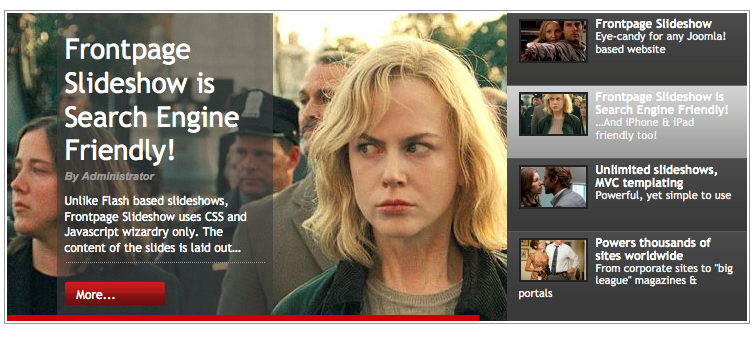
    fpss snapshot 20130829

    It creates an uber cool slideshow from various content sources in Joomla, in a variety of templates and combined effects.

    Frontpage SlideShow allows you to create multiple slideshows within your Joomla website (in different pages or even on the same page), comes with 8 uniquely styled templates, a performant/lightweight slideshow engine with crossfade & carousel based transitions, text effects, statistics and can retrieve content automatically from Joomla articles/menus, K2 items and Virtuemart/HikaShop products!

    Frontpage SlideShow is a pure CSS & JavaScript based slideshow system, which means it's dead simple to customize for any device type.

    And don't worry about how you'll setup your slideshows. Frontpage Slideshow has a dedicated Joomla backend component which you use to effortlessly manage your slideshows. Easy and fast.

    Moreover, it natively supports content fetching from K2 and the most popular e-commerce components for Joomla: Virtuemart and HikaShop. That means you quickly make up your slides just by selecting the source (e.g. a K2 item) and Frontpage Slideshow will fetch in a snap the title, description text and associated image!


    FEATURES

    • Fully compatible with Joomla 1.5 - 3.x & Joomla 3.x UTD
    • Lightweight & frontend optimized slideshow engine, based on jQuery, offering crossfade & carousel transition effects between slides, lava-lamp style navigation, progress bar and text transition effects. That means you have 24 different effect combinations to use!
    • 9 responsive slideshow templates to get you started. Customizing them is very easy as all fonts, font-sizes, colors etc. are controlled by CSS. Building your own is a joy if you know your way around with MVC templating in Joomla.
    • The slide creation process is dead simple to use through guided steps.
    • Drag and drop slide re-ordering (per category) in the backend.
    • Integration with Joomla articles and the most popular Joomla content extensions like K2, Virtuemart & HikaShop. That means Frontpage Slideshow can import the title, text, link and associated image from such components with a single clicks. For example, if you want to create a slide from a K2 item, all you have to do is select that K2 item and Frontpage Slideshow will automatically populate all slide fields, which you are free of course to edit as you wish!
    • You can now display your slideshows either via the module (or multiple module copies) or via the new component view. That means you can create a direct menu link to a specific slideshow, so you can e.g. assign a slideshow to your homepage, without messing with module positions and funky module display conditions. This option is ideal for portfolio based websites that want to assign slideshows directly to Joomla menu items.
    • Multiple slideshows in your Joomla website, even on the same page (thanks to new slideshow engine) - so you can have a slideshow fetched in the component region and an other in a module or in combinations you define.
    • Better slide image uploading using ajax (which means better previewing) and better slide image management (similar to K2's), with multiple copies of your original image created for better performance. And we got some cool new templates to show in the near future using these different size images...
    • Statistics! Frontpage Slideshow will now track (by default) all slideshow clicks and create beautiful statistics graphs in the backend, so you can visually see which are your most popular slides in various timeframes. Using Frontpage Slideshow to promote products? Now you can now which products draw your customers attention more! Statistics can of course be disabled at any time if you prefer SEO over click tracking.
    • Better server-side performance compared to version 2.x. A new caching layer for the module and the new slideshow content prefetching mechanism, which reduces the queries needed to retrieve slide content from third-party extensions (K2, Virtuemart & HikaShop). In high traffic or high content volume Joomla websites, this translates to significantly better performance.

    The component's user interface is very clean and easy to learn. It consists of only 2 areas to edit: your slides and your categories (slideshows).

    Additionally, the styling/customization of each slideshow is entirely HTML/CSS based. You have full control over the layout of the slideshow and you can easily style it to suit your needs. No other website will ever share the same looks as yours!

    As with all our Joomla extensions, Frontpage Slideshow uses MVC template overrides - so you can modify existing templates or create your own from scratch without a) hacking core extension code and b) worrying about future updates breaking up your changes.

    Frontpage Slideshow has been successfully tested in all major browsers. The prebundled slideshow templates are fully compatible with Firefox, Chrome, Safari, Opera, Edge and Internet Explorer version 7 and above.

    SCREENSHOTS

    Backend interface screenshots taken from Joomla 1.5 (which is nearly identical to Joomla 2.5) & Joomla 3.x. Frontpage Slideshow uses the Joomla backend design guidelines so it will match the design of all these Joomla versions, from 1.5 to 3.x.

    {gallery}galleries/FPSS_3.0.0_screenshots{/gallery}